Minecraft Enchantments Order: Complete 2026 Strategy Guide

The order you apply enchantments to your tools, weapons, and armor matters way more than most players realize. Apply them wrong and you'll waste levels, limit your options, and end up with gear that's weaker than it should be. The good news? Once you understand the mechanics, optimizing your enchanting is pretty straightforward.
What Enchantment Order Means
When we talk about enchantment order, we're talking about the sequence in which you apply multiple enchantments to a single item using an anvil. This matters because of how Minecraft calculates the experience cost.
Each time you combine items on an anvil, the cost increases. The first enchantment might cost 5 levels. That second costs more. By the time you're adding your fifth enchantment, you could be looking at 35+ levels just for one more effect. That compounds quickly.
But there's a system to it. If you plan your order strategically, you can add the same enchantments for significantly fewer levels overall. That's the whole game right there.
Understanding the Anvil's Cost Calculation
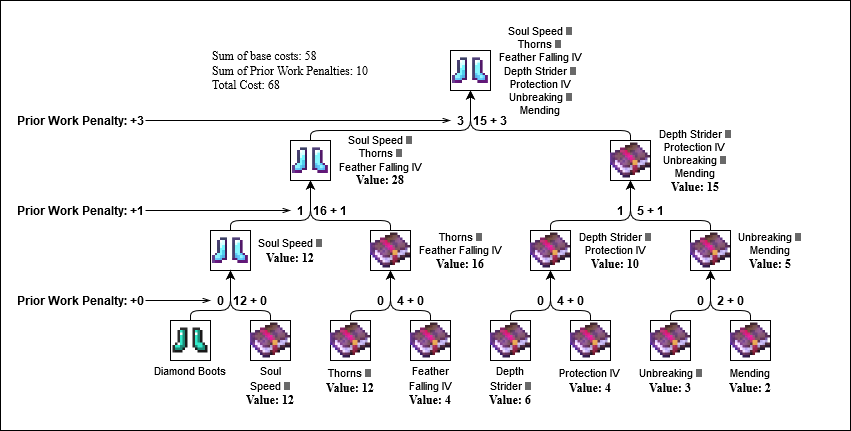
The anvil doesn't just randomly decide costs. It uses a "prior work penalty" system. Every time you've previously used an anvil on an item (whether combining it with another item, adding an enchanted book, or repairing it), that item accumulates a hidden penalty. Combine a penalized item with something else, and both penalties transfer to the result.
This is why the order matters. If you apply enchantments in a bad sequence, you'll hit escalating costs that make later additions impossibly expensive. There's actually a hard cap at around 40 levels per operation in vanilla Survival mode (some servers raise this), so you can lock yourself out of useful enchantments if you're not careful.
Here's the practical side: start with books that have only one enchantment each. Single enchantments are cheaper to apply than multi-enchantment books. As you layer in complexity, you're stacking one penalty at a time instead of hitting big jumps.
The Strategy for Tools and Weapons
For a diamond pickaxe, the typical ideal order is: Efficiency, Unbreaking, then Mending. Why this sequence? Efficiency is the most universally useful enchantment on a pickaxe, so you want it applied first when the cost is lowest. Unbreaking comes next because it's reasonably cheap to add. Mending goes last because it's situational (you need drops to make it work), but when you do want it, it's worth the cost.
Swords follow a similar logic. Sharpness first. Then Knockback or Fire Aspect, depending on your playstyle. Sweep Edge and Looting can go in either order. Mending again last.
Actually, hold on. I should clarify something. The order matters most when you're combining items on an anvil. If you're applying enchantments directly from an enchanting table, order is irrelevant because it's all happening in one transaction. The prior work penalty only applies when you're combining pre-enchanted items.
This distinction trips people up. Enchanting tables don't accumulate prior work penalties. Anvils do. So if you have the option to get Mending from a book instead of an enchanting table, grab the book and use it efficiently on your anvil.
Why Specific Items Need Different Orders
Armor doesn't follow the same rules as tools because the useful enchantments are totally different. For a full set of protection gear, you're looking at Protection, Thorns, Mending, and Unbreaking. Protection IV should go on first across all pieces because it's the core defense. Then you can add Unbreaking and Mending with less concern about order.
Boots are special though. Feather Falling is absolutely essential on boots (fall damage is brutal without it), so that should be priority one. After that, Unbreaking and Mending work fine in any order.
Helmets and chestplates benefit from Thorns if you're doing a lot of close combat, but Thorns is also expensive, so consider whether you really need it or if you'd rather invest those levels elsewhere. Respiration on a helmet is straightforward if you do underwater work.
Common Mistakes That Cost You Levels
The biggest mistake? Slapping random enchanted books onto items without a plan. I've watched players waste 50+ levels just experimenting, then wonder why everything got so expensive. Plan your enchantments before you start combining anything.
Second mistake: combining pre-enchanted items instead of using single-enchantment books. If you've a book with Efficiency AND Unbreaking, applying that costs more than applying Efficiency alone, then Unbreaking alone. Split them up.
Third: using the enchanting table as your primary source for max-level enchantments. Enchanting tables randomize. If you need Sharpness IV and you keep getting Sharpness II, you're grinding forever. Books from fishing, mob drops, or librarian trades are more reliable and cost-effective in the long run.
One more thing: enchanting books you get from fishing or trading might already have prior work penalties baked in if they came from other players' anvils (on multiplayer servers). You can't see this directly, but if a book feels unusually expensive when you apply it, that's why. It's not avoidable, just something to know.
Building Your Optimal Enchanting Checklist
Before you touch your anvil, write down your target enchantments in order from "absolutely essential" to "nice to have." For most tools, this is three to four enchantments max. Don't be greedy.
Gather single-enchantment books in that order. Enchanting tables are fine for the first or second enchantment if you're lucky. Otherwise, go fishing or find a librarian NPC who'll trade you the books you need. This takes patience but saves levels overall.
Apply them one at a time in your planned order. Watch the cost climb. If at any point the cost exceeds what you can reasonably get (remember, the cap is around 40 levels), you've hit the limit. That's when you stop and accept what you've.
And if you're ever not sure whether something is possible, test it on a copy of the item first if you can. Some servers let you do that. Others don't. Either way, knowing your limits saves heartbreak.
Enchanting Strategies for Specific Play Styles
Speed runners focus on Efficiency and Haste, so those go first. If you're speedrunning, you're also less likely to use Mending because you want fast tools that you'll replace frequently. Your order: Efficiency, then whatever else saves time.
Survival players tend to prioritize durability. Unbreaking and Mending are non-negotiable. You might wear a skin like Ordered_Entropy while you grind out these practical enchantments. Efficiency still goes first because you use your pick constantly. Then Mending. Then Unbreaking if you have levels left.
PvP players need speed and damage. Sharpness, Knockback, and Fire Aspect on swords come first. Boots with Feather Falling are crucial (fall damage kills more people than you'd think). The level grind here's different because you're replacing tools more often, so some players skip Mending entirely.
Builders are wild card because it depends what you're building. If you're terraforming, Efficiency and Unbreaking on your pick. If you're doing precise work, you might not care about speed at all. Your mileage varies, which is fine.
Real Talk: When to Reset and Start Over
If you've hit the 40-level cap and your gear is still missing key enchantments, sometimes it's worth scrapping it and starting fresh on a new item. I know that sounds wasteful, but if you miscalculated early and now you're stuck, the prior work penalty is locked in. You can't reduce it.
This is why planning matters. Most tools can be fully enchanted within 30-35 levels if you do it right. If you're already at 40 and still have gaps, something went wrong in your sequencing. Learn from it and plan better next time.
Some players rock skins like datacorder while they manage their enchanting spreadsheets. It's a whole vibe, honestly. If you're this organized about your gear, you'll never hit that level cap problem.
Pro Tips for Maximum Efficiency
Librarians are your best friend. Find ones who trade the enchantment books you need, then lock in those trades. A single librarian who sells Mending is worth its weight in emeralds. Seriously.
Combine as few items as possible. Fewer combines mean fewer prior work penalties. If you can get all your enchantments from one or two books, do that instead of collecting five separate ones.
Silk Touch and Fortune are mutually exclusive on pickaxes, so decide early which one you want. Most players go Fortune because ore drops are more valuable. Silk Touch is niche (cave exploring for specific blocks). Don't waste levels getting both.
Mending might cost 30+ levels, but it essentially gives you infinite tool durability once you have a regular income of experience drops. It pays for itself immediately. Don't skip it just because the upfront cost is high.
Keep backups. If your main pickaxe survives five years of gameplay because of Mending and Unbreaking, that initial investment was absolutely worth it. Some of my most valuable tools have 20+ prior work penalties on them, but they're still cheaper to use than making new ones.
2026 Updates and What's Changed
The enchanting mechanics haven't fundamentally shifted in recent years, which is actually good news for veteran players. Your old knowledge still applies. Minecraft Live 2026 teased some updates coming, but based on dev statements, enchantments aren't getting overhauled anytime soon.
That said, server mods and datapacks can change things. Some servers increase or disable the 40-level cap. Some add new enchantments entirely. If you're playing vanilla on a major server or single player, the strategies here are current through 2026. If you're on a heavily modded server, check with your admins about how their enchanting works.
The community has also gotten smarter about enchanting efficiency overall. Players share calculators and spreadsheets now. If you want to get really precise about your order, tools exist that can calculate the exact sequence for your items. Use them.
Whether you're sporting a simple skin like border or something more elaborate, your gear will shine once you've got these enchantments figured out. The visual appeal is one thing. A practical benefit of optimized enchanting? That's the real upgrade.
Building Your Long Term Enchanting Plan
Don't think of enchanting as a one-time grind. Think of it as an ongoing process. Early game, you enchant as you go and accept that things will be imperfect. Mid game, you start planning. Late game, you've got optimized gear across multiple tools and weapons.
Start a chest dedicated to enchanted books. Whenever you catch a fish, dig through ruins, or trade with villagers, stash those books. Build up an inventory of single-enchantment options. Then when you're ready to fully enchant something, you've got choices.
Some players like roleplay-themed enchanting. They might equip skins like WoodenSworders and focus on sword enchantments, then never touch a pickaxe. That's a valid playstyle. Your enchanting strategy should match your goals, not some universal template.
enchantment order is just math and planning. Understand the mechanics, make a list, gather your books, and apply them systematically. It's honestly one of the most satisfying parts of late-game Minecraft because you see the immediate payoff. Your tools get better right in front of you, and you know exactly why.
If you want to get really deep into optimization, there are community wikis and calculators that break down every scenario. But the fundamentals here will carry you through almost any situation. Plan early. Single-enchantment books first. Watch your levels. And don't be afraid to abandon something if it's clearly not working. You'll get better at this.
Now go enchant something. Your tools are waiting. And if you're curious about other aspects of Minecraft optimization, check out Crystalium_Order for some skin inspiration while you grind. Looking good while you play is half the battle, honestly.