MidnightControls: Play Minecraft Java Edition With a Gamepad
MidnightControls (TeamMidnightDust/MidnightControls)
A Minecraft mod adding controller support and enhanced controls overall.
Java Edition never got the controller love that Bedrock did. MidnightControls fills that gap, letting you play Minecraft with a gamepad - Xbox, PlayStation, Switch Pro, or whatever you've got - without awkward keyboard workarounds. If you've switched to Java for modding or vanilla servers but miss console-style controls, this mod is genuinely worth your time.
What MidnightControls Does
MidnightControls is a Fabric and Quilt mod that adds controller support to Java Minecraft, forked from the discontinued LambdaControls project. It's been under active maintenance by the Midnight Dust team since the original creator stepped back, and it shows - recent releases fixed critical issues like virtual mouse problems that broke splitscreen play.
The mod doesn't just map your gamepad to keyboard keys. It integrates controllers natively, with proper analog stick handling, trigger sensitivity, button mapping, and even on-screen button indicators that match Bedrock Edition's style. You get actual console-quality input, not a bandaid.
It also brings Bedrock features to Java. Touchscreen support for handheld or touch-capable setups, fly drifting so you actually move through the air while flying instead of just hovering, reach-around for placing blocks at awkward angles, and a surprisingly deep settings menu where you can tweak everything from stick deadzone to per-action sensitivity.
Who This Is For
Console players switching to Java Edition for modded servers or pure vanilla play are the obvious audience. Keyboard-and-mouse controls feel unnatural if you've spent years on console, and this mod makes the transition way smoother.
Accessibility is another big one. Carpal tunnel, arthritis, or just physical preferences mean some players need a controller to play comfortably. Java Edition's default setup excludes them entirely - MidnightControls changes that.
And honestly? Sometimes you just want to sit on the couch and relax instead of hunching over a desk. Build a world from your couch, manage your inventory with a gamepad, do combat without your wrists screaming.
Installation (It's Simple)
MidnightControls requires Fabric or Quilt, the two main modloaders for Java Edition. If you don't have one installed, grab the Fabric Launcher or Quilt Launcher from their official sites. Most players use something like MultiMC or Prism Launcher anyway, which makes modloader management trivial.
Once your modloader is set up:
- Download the latest JAR from GitHub (v1.9.4 is current, supporting Minecraft 1.20.4 and 1.20)
- Drop it into your
.minecraft/modsfolder - Launch the game
That's it. The mod loads automatically and you'll get a settings screen on first run. Plug in your controller and you're gaming.
Key Features in Action
Built-in controller recognition handles most modern gamepads out of the box - Xbox, PlayStation (both DualShock and DualSense), Switch Pro, Joy-Cons, and tons of third-party hardware. If yours shows up orange in settings, it's detected but not in the default mapping. Create a custom profile and you're golden. The wiki at midnightdust.eu walks you through it if you get stuck.
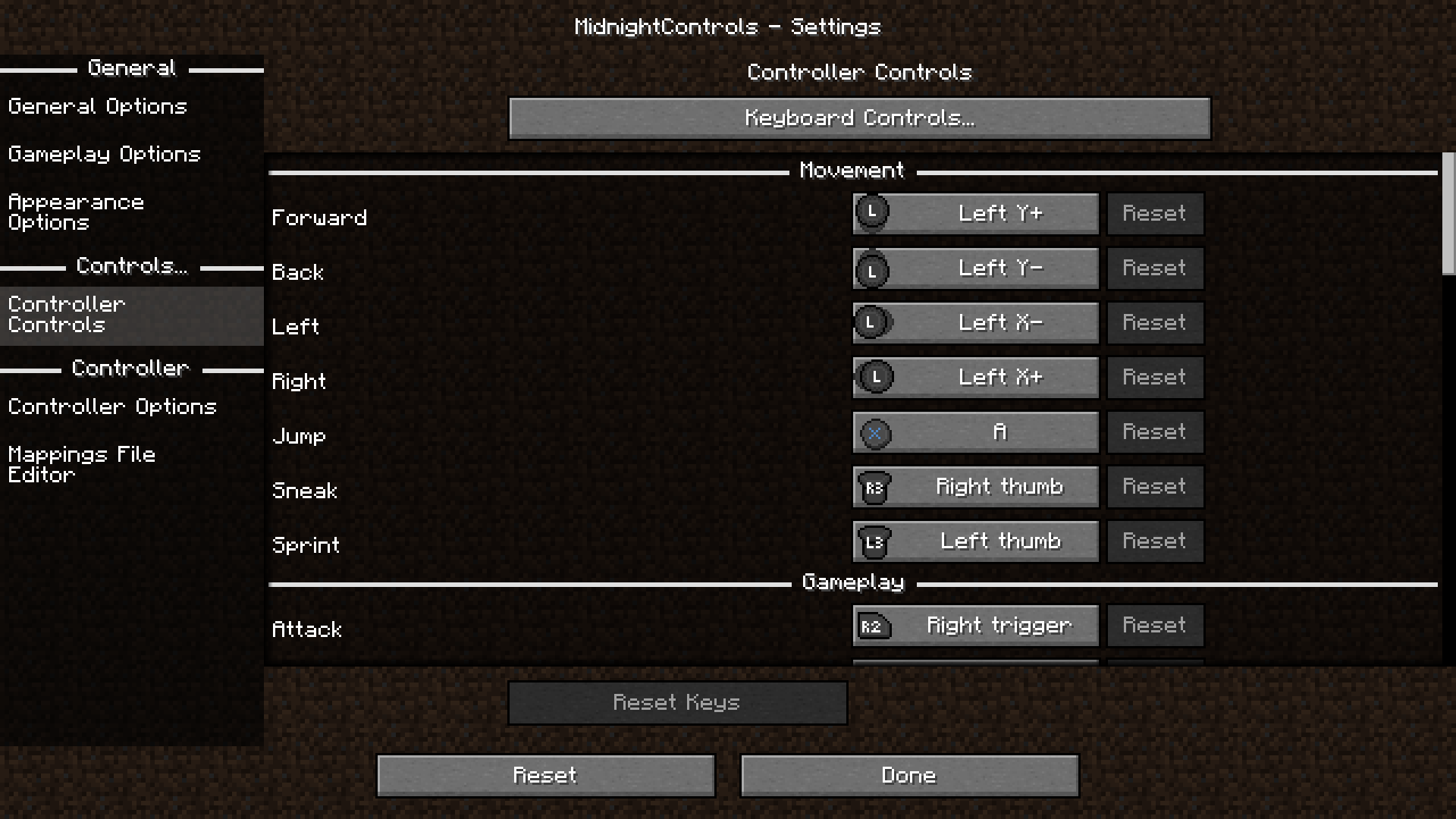
The on-screen button indicator is borrowed straight from Bedrock Edition. A small HUD element shows which button does what, great for teaching other players or just remembering your custom bindings. Toggle it off anytime if it's distracting.
Customization runs deep without being overwhelming. Stick sensitivity adjusts independently for looking vs. turning (so you're not fighting the same deadzone in both), triggers can work as buttons or analog inputs, and every single binding is remappable. Most people leave the defaults alone and it works fine. But if you're picky - and Minecraft players often are - you've got full control.
Virtual mouse support got fixed in v1.9.4, which was a big deal. Before, it was bugged and made splitscreen multiplayer unplayable. Now it's stable. Worth noting if you run multiple players on one PC.
Common Gotchas and Tips
Controller detection is solid these days, but older or obscure hardware sometimes doesn't match any built-in profile. You'll see it flagged orange. Just add a custom mapping in settings and move on.
Fly drifting feels great once you're used to it, but it catches a lot of new users off guard. Hold a direction while flying and you'll drift sideways instead of hovering in place. Disable it in settings if you find yourself flying into mountains.
This is a client-side mod only, meaning you don't need server permission to use it on any server. Hop on a vanilla server, a modded server, whatever - your controller works everywhere.
The reach-around feature is subtle but handy. You can interact with blocks at angles you normally couldn't reach without repositioning your character. Takes a few minutes to stop thinking about it and start using it naturally.
Alternatives Worth Knowing About
MidnightControls is the best-maintained controller mod for Java. InputFix exists and does similar things, but it's less actively updated. Some players use external tools like Xpadder to map controllers to keyboard keys, but it's janky and has latency compared to native support.
If you're on Bedrock Edition, you don't need any of this - controller support is built in. But if you're locked to Java for modded play or specific servers, MidnightControls is the obvious choice. The 207 stars on GitHub and active release cycle show it's got real community support behind it.
Worth Setting Up
If keyboard-and-mouse controls have been holding you back from Java Edition, or if you've got a controller collecting dust, MidnightControls removes that friction. It's stable, it's actively maintained, and it genuinely makes the game feel more console-like in the best way.
And once you've got your controls dialed in, there's a whole world of servers and community builds waiting. Grab a skin from the Minecraft skin browser or jump into a community by checking out the Minecraft server list. Controller support opens up a different way to play, and plenty of other players are already doing it.
Visit TeamMidnightDust/MidnightControls on GitHub ↗
Lead writer at minecraft.how. Long-time Minecraft player running a small SMP server, testing every build, mod, and seed before writing about it.