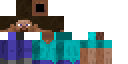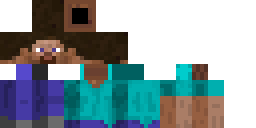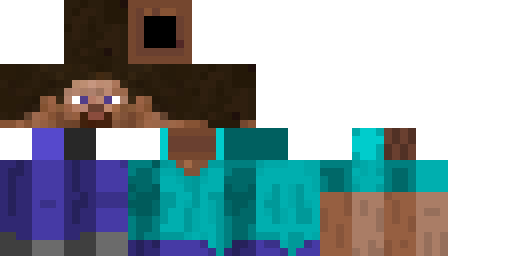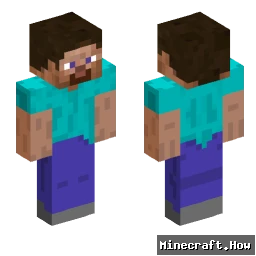
Woives Minecraft 皮肤
✓ 已批准
Skin for Woives
<div class="infobox skin">
<h2><a href="/wiki/Woives" title="Woives">Woives</a> Skin</h2>
<img src="https://example.com/woives_skin.png" alt="Woives Skin" title="Woives Skin">
<p>This skin is designed for <a href="/wiki/Woives" title="Woives">Woives</a> and features a unique creeper-inspired design.</p>
<h3>Download</h3>
<ul>
<li><a href="https://skins.example.com/woives" title="Download Woives Skin">Download Skin (Direct)</a></li>
<li><a href="https://skins.example.com/woives/mcmeta" title="Download Woives Skin (with mcmeta)">Download with mcmeta</a></li>
</ul>
<h3>Installation</h3>
<ol>
<li>Download the skin</li>
<li>Go to <a href="https://www.minecraft.net/" title="Minecraft Official Website">Minecraft Website</a> and log in</li>
<li>Navigate to the skin section and upload the downloaded skin</li>
</ol>
<h3>Compatibility</h3>
<p>This skin is compatible with Minecraft 1.20+ and works in both survival and creative modes.</p>
<h3>Credits</h3>
<p>Skin created by <a href="/wiki/User:SkinCreator2023" title="User:SkinCreator2023">SkinCreator2023</a></p>
</div>
<div class="infobox skin">
<h2><a href="/wiki/Woives" title="Woives">Woives</a> Skin</h2>
<img src="https://example.com/woives_skin.png" alt="Woives Skin" title="Woives Skin">
<p>This skin is designed for <a href="/wiki/Woives" title="Woives">Woives</a> and features a unique creeper-inspired design.</p>
<h3>Download</h3>
<ul>
<li><a href="https://skins.example.com/woives" title="Download Woives Skin">Download Skin (Direct)</a></li>
<li><a href="https://skins.example.com/woives/mcmeta" title="Download Woives Skin (with mcmeta)">Download with mcmeta</a></li>
</ul>
<h3>Installation</h3>
<ol>
<li>Download the skin</li>
<li>Go to <a href="https://www.minecraft.net/" title="Minecraft Official Website">Minecraft Website</a> and log in</li>
<li>Navigate to the skin section and upload the downloaded skin</li>
</ol>
<h3>Compatibility</h3>
<p>This skin is compatible with Minecraft 1.20+ and works in both survival and creative modes.</p>
<h3>Credits</h3>
<p>Skin created by <a href="/wiki/User:SkinCreator2023" title="User:SkinCreator2023">SkinCreator2023</a></p>
</div>
0
下载
2.5K
浏览
Minecraft profile
bd5bc4a7-9bbf-4617-ab40-38ba3ae74e7dModel
classic
Views / 30 days
50
Observed names
Dates show when minecraft.how first observed each name.
Woives—
Skin history
History grows as minecraft.how observes profile changes.

Head command
/give @p minecraft:player_head[profile={name:"Woives"}]

标签
Minecraft皮肤Woives
常见问题
要下载 Woives Minecraft 皮肤:
- 点击「下载」按钮获取此免费 Woives 皮肤
- 皮肤文件
.png将保存到您的设备 - 支持 Java 版 和 基岩版
- 请参阅下方获取完整安装说明
要应用 Woives 皮肤:
- 在 Minecraft 官方网站登录您的 Mojang 或 Microsoft 账户。
- 前往个人资料中的「皮肤」部分。
- 上传下载的
.png文件。 - 启动 Minecraft,您的角色现在将使用 Woives 皮肤。
注意:Minecraft Java 版 和 Minecraft 基岩版 之间的步骤可能略有不同。
是的,Woives 皮肤兼容 Minecraft Java 版 和 Minecraft 基岩版。不过,两个版本之间应用皮肤的方法可能略有不同。请按照本页面为您特定版本提供的说明进行操作。
当然可以!您可以使用 Minecraft 皮肤编辑器 编辑 Woives 皮肤。只需在编辑器中打开下载的
.png 文件,进行更改并保存。然后将编辑后的皮肤上传到您的 Minecraft 个人资料。如果 Woives 皮肤无法使用,请尝试以下操作:
- 确保您下载的是正确的文件格式
.png。 - 确保您使用的是正确版本的 Minecraft:Java 版 或 基岩版。
- 检查皮肤文件是否已损坏。如有必要,请重新下载皮肤。
- 退出并重新登录您的 Mojang 或 Microsoft 账户以刷新个人资料。