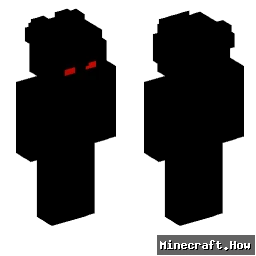
Skin showcase
Watch Page →alfred146 Minecraft 皮肤
✓ 已批准
这个 skin 改变你的玩家模型的外观,与用户名 alfred146 相关联。在公共 servers 或你自己的单人游戏世界中使用它。下载是一个标准 PNG 文件,你可以通过 Minecraft launcher 或个人档案设置应用。在几秒钟内为你的角色赋予新的身份。
80
下载
2.5K
浏览
Minecraft profile
ce79d4cf-9aba-425a-af75-b2005f5f5487Model
classic
Views / 30 days
121
Observed names
Dates show when minecraft.how first observed each name.
alfred146—
Skin history
History grows as minecraft.how observes profile changes.

Head command
/give @p minecraft:player_head[profile={name:"alfred146"}]
标签
Minecraft皮肤alfred146javaneutral
常见问题
要下载 alfred146 Minecraft 皮肤:
- 点击「下载」按钮获取此免费 alfred146 皮肤
- 皮肤文件
.png将保存到您的设备 - 支持 Java 版 和 基岩版
- 请参阅下方获取完整安装说明
要应用 alfred146 皮肤:
- 在 Minecraft 官方网站登录您的 Mojang 或 Microsoft 账户。
- 前往个人资料中的「皮肤」部分。
- 上传下载的
.png文件。 - 启动 Minecraft,您的角色现在将使用 alfred146 皮肤。
注意:Minecraft Java 版 和 Minecraft 基岩版 之间的步骤可能略有不同。
是的,alfred146 皮肤兼容 Minecraft Java 版 和 Minecraft 基岩版。不过,两个版本之间应用皮肤的方法可能略有不同。请按照本页面为您特定版本提供的说明进行操作。
当然可以!您可以使用 Minecraft 皮肤编辑器 编辑 alfred146 皮肤。只需在编辑器中打开下载的
.png 文件,进行更改并保存。然后将编辑后的皮肤上传到您的 Minecraft 个人资料。如果 alfred146 皮肤无法使用,请尝试以下操作:
- 确保您下载的是正确的文件格式
.png。 - 确保您使用的是正确版本的 Minecraft:Java 版 或 基岩版。
- 检查皮肤文件是否已损坏。如有必要,请重新下载皮肤。
- 退出并重新登录您的 Mojang 或 Microsoft 账户以刷新个人资料。