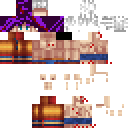
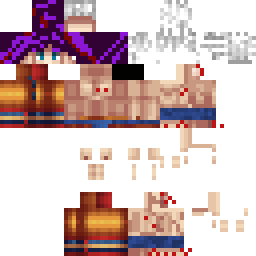
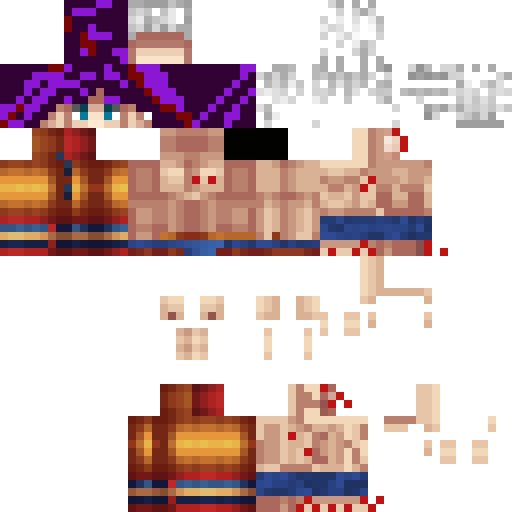
GOKUSAIYANXD Minecraft 皮肤
✓ 已批准
Skin for GOKUSAIYANXD
If you're looking for a unique skin for your Minecraft character, inspired by the creative username GOKUSAIYANXD, here's a simple guide on how to find or create one:
1. **Search Online**:
- Visit Minecraft skin websites (e.g., <a href="https://www.minecraftskins.com/">MinecraftSkins.com</a>, <a href="https://skins.minecraft.net/">Minecraft.net Skins</a>).
- Use the search bar with the keyword "GOKUSAIYANXD" to see if a community member has already created a skin inspired by this name.
2. **Create Your Own Skin**:
- **For Beginners**:
- Use an online skin creator tool (e.g., <a href="https://minecraftskincreator.com/">Minecraft Skin Creator</a>).
- Design your skin inspired by "GOKUSAIYANXD". Consider themes like:
- **Dragon Ball Z Inspiration**: Given the "Goku" in the username, you might incorporate elements inspired by Goku from Dragon Ball Z (e.g., Super Saiyan hair, gi).
- **Saiyan & XANXD Elements**: Incorporate saiyan tail, or humorously, a sad face (for "XANXD") on the back or an accessory.
- Download and apply the skin via your <a href="https://account.minecraft.net/profile/skins">Minecraft Account</a>.
- **For Experienced Editors**:
- Open <a href="https://www.adobe.com/products/photoshop.html">Photoshop</a> or your preferred image editing software.
- Open a Minecraft skin template (1.20+ format).
- Design your skin with detailed "GOKUSAIYANXD" inspirations.
- Save as PNG and upload to your Minecraft account.
3. **Share Your Creation**:
- If you've created a skin, share it on Minecraft forums, Reddit (<a href="https://www.reddit.com/r/MinecraftSkins/">r/MinecraftSkins</a>), or the skin websites mentioned, tagging "GOKUSAIYANXD" for discovery.
**Remember**: Always respect copyright and fair use when designing skins inspired by external IPs.
---
**Server Note for GOKUSAIYANXD's Fans**:
If "GOKUSAIYANXD" hosts a **server** (e.g., Survival, Creative, Hardcore), ensure to:
- **Spawn** safely.
- Beware of **mobs** (especially **Creeper** and **Enderman** in certain **biomes**).
- Utilize **redstone** for automations.
- Explore the **Nether** and **The End** with caution.
- Check for **mods** that might alter **loot** from **spawners** or **build** requirements.
---
**Skin Example for Inspiration (Vanilla Compatible)**:
```plain
# This is a text representation. Actual skins are image files.
# Head
# ...
# Cape (If Adding Saiyan Tail Concept)
# ...
```
**Actual skin creation requires an image file formatted for Minecraft skins (64x32 pixels for player skins in .png format).**
---
**Download and Apply**:
- Once designed or found, download the `.png` skin file.
- Go to <a href="https://account.minecraft.net/profile/skins">your Minecraft profile</a>, upload the skin, and **select** it to apply.
**Enjoy your new GOKUSAIYANXD-inspired skin in Minecraft!**
2
下载
203
浏览
0
喜欢
反应
登录后即可做出反应。
Minecraft profile
66930fa2-fc09-4eb5-8838-c6a6395d5ff7Model
classic
Views / 30 days
32
Observed names
Dates show when minecraft.how first observed each name.
GOKUSAIYANXD—
Skin history
History grows as minecraft.how observes profile changes.

Head command
/give @p minecraft:player_head[profile={name:"GOKUSAIYANXD"}]
标签
Minecraft皮肤GOKUSAIYANXD
常见问题
要下载 GOKUSAIYANXD Minecraft 皮肤:
- 点击「下载」按钮获取此免费 GOKUSAIYANXD 皮肤
- 皮肤文件
.png将保存到您的设备 - 支持 Java 版 和 基岩版
- 请参阅下方获取完整安装说明
要应用 GOKUSAIYANXD 皮肤:
- 在 Minecraft 官方网站登录您的 Mojang 或 Microsoft 账户。
- 前往个人资料中的「皮肤」部分。
- 上传下载的
.png文件。 - 启动 Minecraft,您的角色现在将使用 GOKUSAIYANXD 皮肤。
注意:Minecraft Java 版 和 Minecraft 基岩版 之间的步骤可能略有不同。
是的,GOKUSAIYANXD 皮肤兼容 Minecraft Java 版 和 Minecraft 基岩版。不过,两个版本之间应用皮肤的方法可能略有不同。请按照本页面为您特定版本提供的说明进行操作。
当然可以!您可以使用 Minecraft 皮肤编辑器 编辑 GOKUSAIYANXD 皮肤。只需在编辑器中打开下载的
.png 文件,进行更改并保存。然后将编辑后的皮肤上传到您的 Minecraft 个人资料。如果 GOKUSAIYANXD 皮肤无法使用,请尝试以下操作:
- 确保您下载的是正确的文件格式
.png。 - 确保您使用的是正确版本的 Minecraft:Java 版 或 基岩版。
- 检查皮肤文件是否已损坏。如有必要,请重新下载皮肤。
- 退出并重新登录您的 Mojang 或 Microsoft 账户以刷新个人资料。